
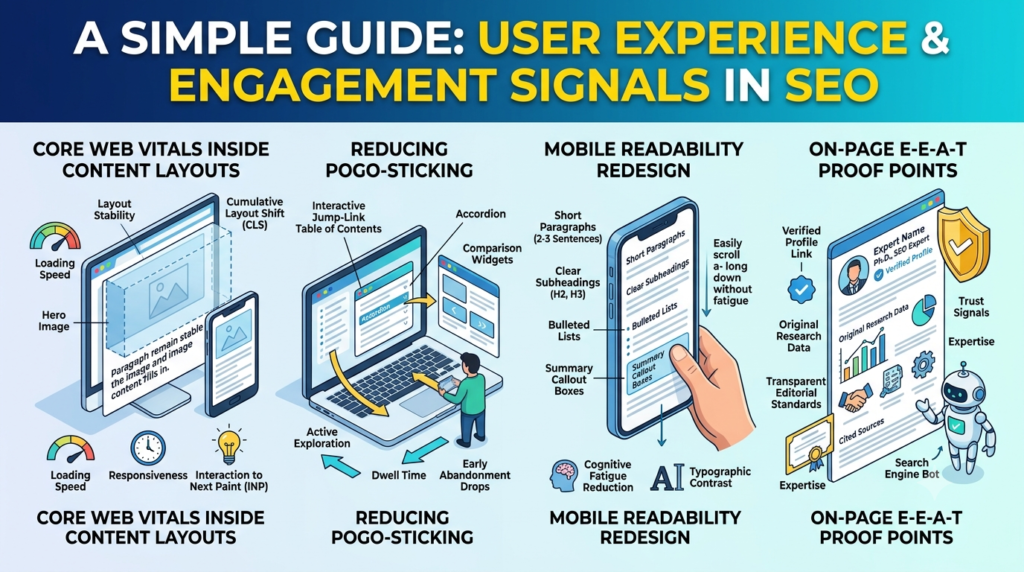
1. Core Web Vitals Inside Content Layouts
How Layout Decisions Impact Interaction Signals
The arrangement of visual elements directly influences how users interact with a web page. When hero images load without designated dimensional boundaries, they cause sudden visual jumps during DOM rendering. These unexpected layout shifts frustrates readers trying to focus on text content. Modern search engines evaluate these disruptions through Core Web Vitals metrics like Cumulative Layout Shift (CLS).
Layout Instability Example:
[ Hero Image Loads Late ] ---> [ Paragraph Jumps Downward ] ---> Reader Loses Place
Third-party ad scripts and dynamic media frames also consume execution thread bandwidth. When readers tap a button or scroll past a dynamic banner, heavy background code can delay response time, resulting in poor Interaction to Next Paint (INP) scores. Reserving explicit height containers for dynamic elements prevents sudden content movement and keeps interaction latencies low.
2. Reducing Pogo-Sticking
Designing Layouts That Keep Readers Engaged
“Pogo-sticking” occurs when a searcher clicks on a result, finds the content confusing or slow, and immediately bounces back to the search page. This behavior signals to search engines that the page failed to satisfy user intent. To prevent instant exits, content layouts must offer immediate clarity right from the top of the page.
Pogo-Sticking Cycle:
Search Page ---> Clicks Site ---> Slow / Disorganized Content ---> Bounces Back ---> Lower Ranking
Integrating navigational shortcuts—such as jump-link tables of contents, interactive accordions, and comparison widgets—encourages active exploration. When visitors can quickly find the specific information they need, overall dwell time increases and early abandonment drops.
3. Mobile Readability Redesign
Formatting Long-Form Content for Fast Mobile Scrolling
Mobile devices generate the majority of modern search traffic, yet dense text blocks create significant friction on smaller screens. Long paragraphs turn into unbroken walls of text on mobile displays, causing cognitive fatigue for users looking for fast answers.
To maintain high readability on mobile:
- Keep paragraphs short—ideally two to three sentences per block.
- Use clear subheadings (H2s and H3s) to break topics into scannable chunks.
- Intersperse key points with bulleted lists and summary callout boxes.
- Maintain clean typographic contrast and generous line spacing to prevent user eyes from straying during rapid vertical scrolling.
4. On-Page E-E-A-T Proof Points
Displaying Trust Signals Directly on the Page
Search systems evaluate content credibility using Experience, Expertise, Authoritativeness, and Trustworthiness (E-E-A-T) signals. Beyond clear written prose, explicit trust elements must be visible directly on the page to reassure both human readers and algorithm parsers.
Trust Signal Checklist:
[ Expert Author Bio ] + [ Original Research Data ] + [ Transparent Editorial Standards ] = High Trust Score
Detailed author bio cards featuring industry credentials, direct links to external profiles, and clear publication dates demonstrate genuine human subject expertise. Including first-person testing methodology, original data sets, transparent editorial guidelines, and cited sources builds structural credibility, ensuring visitors—and search crawlers—recognize the page as a reliable, authoritative source.