
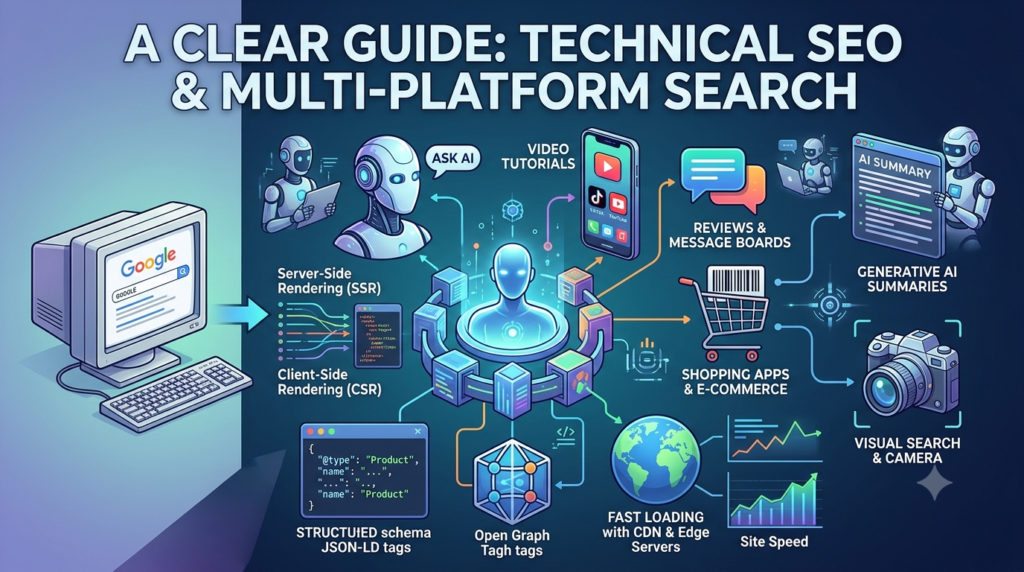
1. The Big Shift: From One Search Engine to Many
Search Beyond Traditional Web Browsers
People no longer look up information in just one place. In the past, almost everyone typed a query into a single search box on a computer screen. Today, discovery happens across a vast web of platforms. Users ask questions to AI assistants, search for visual tutorials on video apps, look up reviews on message boards, and buy products directly inside shopping apps.
Because of this change, websites cannot just focus on traditional search engines. A modern website must make its data easy for many different systems to read, extract, and display.
How Search Bots and Modern AI Understand Web Content
Old search tools worked like basic file sorters. They looked for exact words on a page and counted links to decide what was important. Modern search systems use artificial intelligence to read for meaning rather than just matching exact keywords.
These AI systems turn text and pictures into math concepts so they can understand context. If a web page is messy, slow, or poorly organized, these systems get confused. Making your technical setup clean ensures that both standard search bots and smart AI tools can clearly understand what your business offers.
2. Technical Basics: Helping Bots Read Your Site Easily
Server-Side Rendering vs. Client-Side Rendering
When a user opens a web page, their web browser has to assemble the page code into a visual display. Many modern websites use heavy code scripts that make the visitor’s computer or phone do all the assembly work. This is called client-side rendering. While it can make sites feel interactive, it often slows down search bots trying to read the page quickly.
Client-Side Rendering (CSR):
Server sends empty page -> Browser downloads heavy code -> Browser builds page (Slow for bots)

Server-Side Rendering (SSR):
Server builds page first -> Server sends finished page -> Browser displays it immediately (Fast for bots)
To fix this, technical teams use server-side rendering. This means the website server builds the page before sending it out. When a search bot visits, it instantly gets a complete page of text and images without waiting around.
Cleaning Up Wasteful Web Paths and Crawl Budgets
Search bots do not have infinite time to spend on a single website. They set a limit on how many pages they will check during a visit. This limit is often called a crawl budget.
+-----------------------------------------------------------------------+
| COMMON CRAWL WASTERS             REPAIR STRATEGY                      |
+-----------------------------------------------------------------------+
| Infinite URL filters        ---> Disable unnecessary sorting options  |
| Broken redirect links       ---> Point old links straight to new page |
| Blank or broken pages       ---> Send proper 404 error codes          |
+-----------------------------------------------------------------------+
If your site has thousands of duplicate links created by store filters, or long chains of old broken links, bots waste time on useless paths. Cleaning up these dead ends ensures bots spend their limited time reading your most important, revenue-generating pages.
3. Organizing Content for Computer Reading
Using Structured Data and Schema
Computers do not read articles the same way humans do. A human sees a price tag and instantly knows a product costs money. A computer bot needs explicit labels to be certain.
Structured data (often added using a code format called JSON-LD) acts like a digital name tag for your content. It tells search bots exactly who wrote an article, what a product costs, or how customers rate a service.
JSON
{"@context": "https://schema.org",
  "@type": "Product",
  "name": "Eco-Friendly Water Bottle",
  "price": "25.00",
  "priceCurrency": "USD"}
Adding these simple code tags helps search tools show rich details—like review stars, prices, and event dates—directly in search results.
Sharing Data Across Social and Search Networks
When someone shares your web link on social media or messaging apps, the platform creates a preview card with a title, description, and image. This is controlled by standardized social meta tags, such as Open Graph tags.
By matching your structured data with social tags, you make sure your content looks great everywhere it gets shared. Whether a link shows up in an AI answer, a chat message, or a traditional search page, the title and image remain clear and helpful.
4. Site Speed and User Experience
Fast Loading with Edge Networks
Speed is a major factor in how well a website ranks across platforms. If a page takes more than a few seconds to load, users click away, and search bots move on. High load times are usually caused by servers located far away from the user.
To solve this, websites use Content Delivery Networks (CDNs) and edge servers. These technologies keep copies of your web files on computers located all around the world. When a user in London or Tokyo visits your site, the page loads from a local server near them in a fraction of a second.
Fixing Page Jumps and Laggy Buttons
Search engines check real-world user metrics to see if a site is easy to use. They look at three main areas:
- Loading Speed: How fast the main picture or headline appears on the screen.
- Responsiveness: How quickly the page reacts when someone clicks a button or menu.
- Visual Stability: Stopping elements on the page from suddenly jumping around while loading.
Layout Shift Problem:
[ Image loads late without reserved space ] ---> [ Text jumps down suddenly ] ---> User misclicks!
Simple fixes make a big difference. Setting clear dimensions for pictures prevents layout jumps, and reducing heavy background code keeps buttons clicking smoothly without lag.
5. How Optimization Works Across Different Platforms
Generative AI and Search Summaries
AI search tools read information from across the web and summarize it into quick, direct answers for users. To make sure these tools cite your website as a source, your content needs to be straightforward and easy to parse.
Query: "How to fix a leaky faucet"
  │
  ├──► AI searches web sources
  ├──► Extracts short, clear steps
  └──► Displays answer with links back to original sites
- Write direct answers near the top of your articles.
- Use bullet lists and simple summary tables to present data clearly.
- Keep your main setup file (
robots.txt) open so AI bots can read your helpful guides.
Social Media Search Engine Features
Platforms like TikTok, YouTube, and Reddit are now used as everyday search engines, especially by younger audiences. People search these platforms to see authentic video reviews and discussions.
To rank well on social search:
- Speak key terms clearly out loud during videos so automated captions pick them up.
- Add text titles directly onto video screens.
- Structure forum posts with clear titles and topic tags so traditional search engines can index the discussion threads.
E-Commerce and Shopping Engines
Shopping sites use strict algorithms designed to show products people are ready to buy. Unlike standard web search, shopping platforms care most about sales history, product details, and stock availability.
E-Commerce Search Priority:
Clear Product Title + Complete Specs + In-Stock Status = High Search Ranking
Keep your store search friendly by uploading clean product lists with complete details like size, color, and material. Keeping your inventory count up to date in real time prevents buyers from clicking on items that are sold out.
6. Preparing for the Future of Search
Searching with Images and Cameras
Visual search lets people take a photo with their phone camera to find matching products or information instantly. AI tools look at shapes, colors, and patterns in the photo instead of reading text words.
Photo Taken with Phone ---> AI Scans Visual Pattern ---> Shows Matching Web Products
Help visual tools find your site by:
- Uploading crisp, clear photos using modern web formats like WebP or AVIF.
- Adding clear file names and image descriptions that explain what is in the photo.
- Tagging pictures with product details so AI tools can match your items accurately.
Getting Ready for Autonomous AI Agents
In the near future, personal AI software will handle tasks for people automatically. An AI agent might compare hotel prices, order groceries, or book appointments on a user’s behalf.
To prepare for AI agents, websites will need clear, structured pathways that allow software to interact directly with web forms and store catalogs. Making sure your site is clean, fast, and organized ensures both human visitors and automated assistants can easily use your services.